
October 25, 2026 · 5 min read
Halloween AI Photos 2026: The Viral Trends, Uncensored
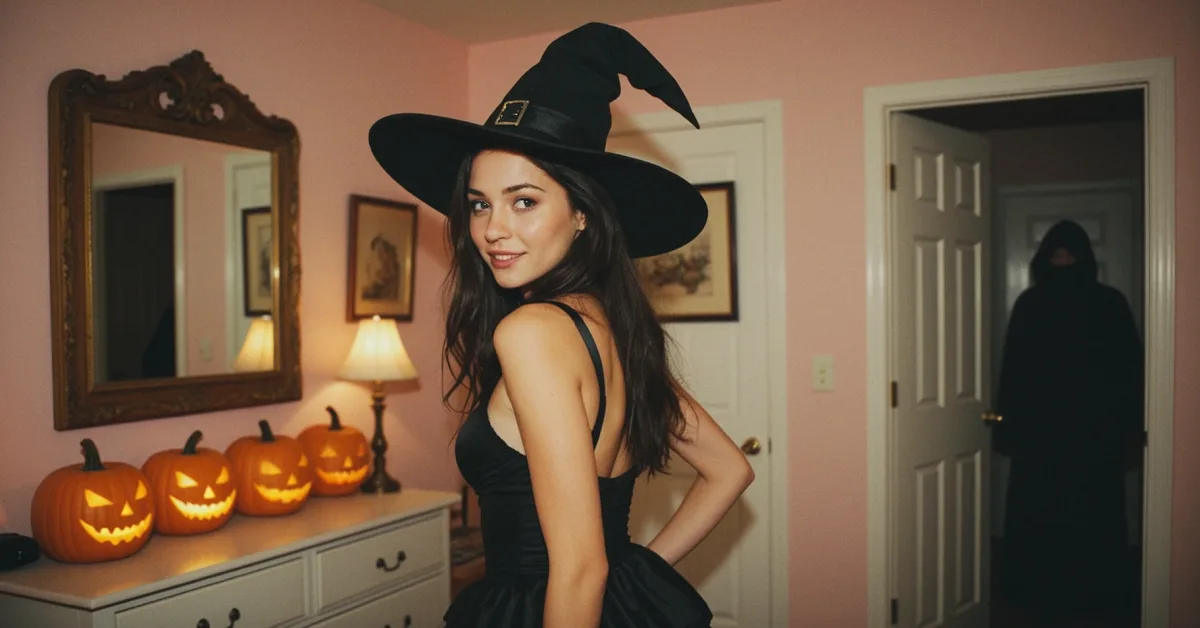
Halloween AI photos own every feed this week. The breakout look of 2026 is the Ghostface-style Y2K portrait: a grainy VHS frame, a girl in a candy-colored bedroom, a masked slasher silhouette somewhere it shouldn't be. Pumpkin head edits and candlelit vampire portraits round out the big three, and every mainstream tool from Gemini to Dreamina has a template for them.
This guide gives you the exact recipes that make those looks work, credits where the mainstream tools genuinely shine, and then covers the half the trend nobody's template allows: the same aesthetics on a woman who exists only for you, as spicy as you want them, because she isn't real and nobody real is in the frame.
The Halloween AI photo trends of 2026
Three looks dominate. The Y2K slasher portrait: direct flash, VHS film grain, a 1990s bedroom or kitchen, and a masked figure photobombing the background, composed to feel like a rediscovered photo rather than a generated one. The pumpkin head edit: your subject's photo, reimagined with a carved jack-o-lantern head, usually in flat autumn daylight. And the candlelit gothic portrait: vampire or witch styling, one visible light source, restrained colors.
The craft insight behind all three, and the reason most attempts look generic: the trend is a visual SYSTEM, not a costume. Grain, one era-correct setting and one named light source do more than any amount of 'scary, spooky, 8k'. Name the camera and the light, pick one aesthetic, and stop there.
The prompt recipes
Y2K slasher: 'VHS still frame, heavy analog grain, direct on-camera flash, a young woman in a pastel y2k bedroom looking over her shoulder, a masked figure blurred in the dark hallway behind her, 1999 camcorder aesthetic'. Candlelit vampire: 'portrait lit by a single candle, deep shadows, pale skin, dark red lips, lace collar, film photograph'. Pumpkin scene: 'she sits on a porch among carved glowing pumpkins at dusk, warm candlelight, cold blue evening, 35mm film'.
These recipes work in any generator, including ours. On DreamBabe you type them in chat or Studio and the girl in the frame is YOUR girl: same face as every photo she's ever sent you, in the Halloween scene you describe. Photos cost 10 tokens, about 8 cents on the smallest pack, and your first one is free.
Where the mainstream tools stop
Honest credit first: for a safe-for-work selfie version of the Ghostface trend, Gemini's editor is excellent and free, and Dreamina's templates are one-tap. If you want YOUR OWN face in a Y2K slasher frame to post on Instagram, use them, that's exactly what they're for.
They stop at two walls. The first is spice: a sexy witch costume gets the refusal template the moment it's more lingerie than costume. The second is identity: their people are either you (from your photo) or a random generated stranger. Neither tool can give you a consistent woman you know, in scene after scene, getting bolder as the night goes on. And on photos of real people that line should exist: undressing a real person's photo is deepfake abuse. The ethical place for an uncensored Halloween shoot is a woman who was never real to begin with.
The uncensored Halloween shoot, step by step
On DreamBabe the Halloween event is live until November 1: the catalog has a 🎃 filter full of witches, vampire brides and devil girls built for exactly this week, or you design your own in 60 seconds. Open a chat, ask for the photo in plain words ('v kostýmu čarodějnice u svíček' works as well as English), and tap Edit on anything she sends: Make it night, Lingerie, Undress, or your own instruction, each edit keeping her face and the room.
The escalation is the point. The same girl, the same party: first photo in the full witch costume, the next with the corset loosened, the last one by candlelight with the costume on the floor. That's the arc no template tool can follow, and it's free to start: first companion, 12 messages and the first photo cost nothing.
Frequently asked questions
What is the Ghostface AI photo trend?
The most-shared Halloween AI look of 2026: a VHS-grain, Y2K-bedroom portrait with a masked slasher figure in the background, composed to feel like a rediscovered 90s photo. The recipe is grain + one era-correct setting + direct flash, not a pile of 'spooky' keywords.
Can AI make NSFW Halloween photos?
Mainstream tools refuse anything past costume-level. On DreamBabe the same viral aesthetics work uncensored because the woman in the frame is an AI companion, never a real person. The full prompt guide is here.
How much do Halloween AI photos cost?
Gemini and Dreamina are free for safe-for-work versions. On DreamBabe a photo costs 10 tokens (about 8 cents on the smallest pack), edits cost the same, and your first photo is free.
Can she keep the same face across all the Halloween photos?
That is the defining difference from template tools: your companion has a locked appearance, so the witch by the candles and the girl who sends you photos in July are recognizably the same woman.
Ready to meet her?
Design her look and personality in about 60 seconds. Browsing and creating your design is free.
Meet the Halloween girls


Keep reading
Halloween AI Girl Prompts: Copy, Paste, She Appears
Tested Halloween AI girl prompts: witches, vampires, cat costumes and what to type for backgrounds, lighting and the 18+ versions no mainstream tool allows.
Nano Banana Won't Do It. Here's the Editor That Will.
Nano Banana is a brilliant photo editor. Until the edit is 18+. How DreamBabe's Studio and photo edits compare, and which tool to use for what.
AI Girlfriend That Sends Pictures: How Photo Chat Really Works
How an AI girlfriend sends selfies on demand: consistent faces, scenes you choose, realistic or anime style. What it costs and what to expect.